 English
 Best CCTV Networking Equipment in Kenya
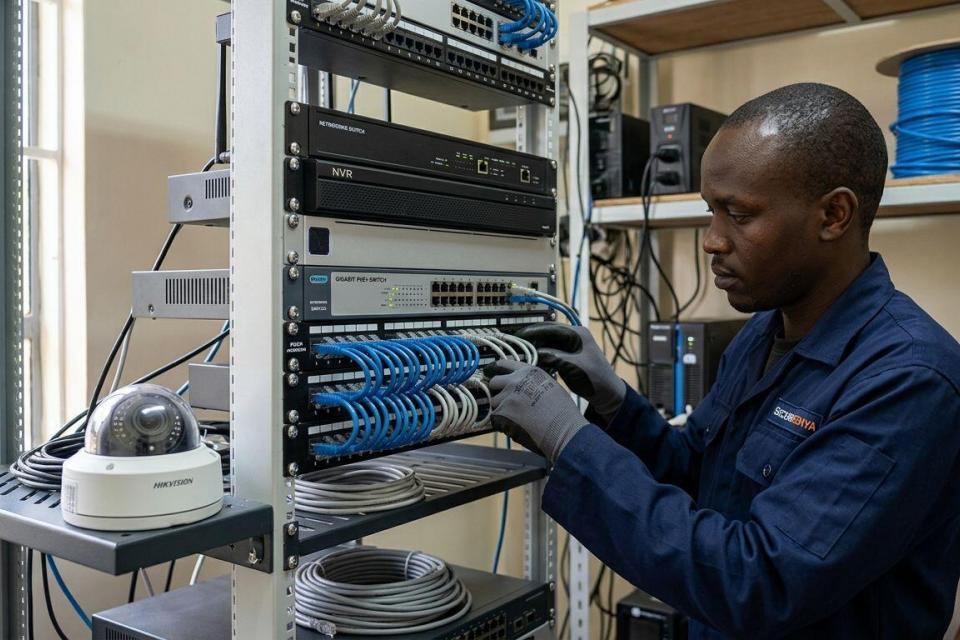
Choosing the best networking equipment for CCTV installation determines whether your cameras stay online, record cleanly, and stream to your phone without lag. In Kenya's current market that means matching a PoE switch, an NVR, structured cabling, and backup power to your camera count and site layout — not buying the cheapest box on the shelf.
- A PoE switch sized to your camera count is the single most important piece of networking equipment for CCTV installation.
- Cat6 cabling covers most Kenyan homes; Cat6a or fiber is needed past 90-100 metres.
- An NVR’s channel count and storage bay count must match your camera plan, not just today’s install.
- A UPS rated for your switch and NVR load keeps recording running through Kenya’s power cuts.
- Fiber media converters solve long perimeter runs on commercial and estate sites better than repeaters.
Why this matters
A CCTV system is only as reliable as the network carrying its footage. Cameras that drop off the switch, an NVR that runs out of storage bays, or a power cut that kills the recorder mid-incident all trace back to networking equipment decisions made at install time, not the camera brand.
Anyone comparing CCTV cameras for home security in Kenya needs to plan the network layer alongside the cameras themselves — the two are bought together but designed separately, and skipping that step is the most common cause of failed installs.
What makes the best networking equipment for CCTV
- PoE power budget covers every camera's wattage with headroom, not the bare minimum
- Cable rating matches the distance and bandwidth of the run — Cat6 or better for anything past 50 metres
- NVR channel count matches your camera count with room for two or three future additions
- Surge and lightning protection on outdoor runs, standard for Kenya's rainy-season conditions
- Backup power runtime covers typical outage length on your site, not just a five-minute ride-through
- Remote access setup that supports mobile viewing without exposing the network
At a glance
| Equipment | Best for | Standout feature | Key limitation |
|---|---|---|---|
| PoE switch | Powering multiple cameras on one cable | Single cable for data and power | Port count limits future camera additions |
| NVR | Centralized recording and playback | Matches channel count to camera plan | Storage fills faster with high-resolution cameras |
| Cat6/Cat6a cabling | Standard-distance camera runs | Rated to 100 metres, low interference | Needs conduit protection outdoors |
| UPS / power backup | Keeping recording alive through outages | Runtime scales with battery size | Bigger runtime needs bigger, heavier units |
| Fiber media converter | Long perimeter and estate runs | Runs far beyond the 100m copper limit | Needs a converter at each end |
| Router/firewall | Remote viewing and network separation | Keeps CCTV traffic off the main office network | Needs correct configuration to stay secure |
1. PoE Switch: best networking equipment for CCTV installation for powering multiple cameras
A Power over Ethernet switch sends both data and power down a single cable to each camera, cutting out separate power runs and adapters. It's the backbone of almost every modern CCTV network in Kenya because it turns a multi-cable install into a single-cable one.
PoE switch pros:
- Removes the need for separate power cabling to each camera
- Simplifies cable runs from the DVR/NVR closet to camera positions
- Most models support the 48V standard used by mainstream CCTV cameras
PoE switch cons:
- Total power budget caps how many cameras (and what wattage) it can run
- Adding cameras later can exceed the switch's power budget without warning
PoE switch pricing: confirm current options and specifications on the Patsec Security Store product listings.
Best for: any CCTV install with three or more cameras. Verdict: Buy.
2. Network Video Recorder (NVR): best for centralized recording and storage
An NVR receives footage over the network from IP cameras, records it to internal drives, and serves playback to a monitor or a mobile app. Unlike a DVR, it doesn't need coax cabling, which keeps installs simpler on new-build sites.
NVR pros:
- Channel count scales from 4 to 32+ depending on the model
- Storage bays let you size recording days to your retention needs
- Most current models support mobile app playback out of the box
NVR cons:
- Storage fills faster at 4K resolution than at 1080p
- Underpowered NVRs choke on continuous recording from many high-resolution cameras
Best for: sites needing centralized recording across four or more cameras. Verdict: Buy.
3. Cat6/Cat6a Structured Cabling: best for long, clean camera runs
Structured cabling is the physical backbone linking cameras to the switch. Cat6 handles most residential and small commercial runs up to 100 metres; Cat6a adds shielding for runs near electrical interference or outdoor exposure.
Cat6/Cat6a pros:
- Rated for the bandwidth modern IP cameras need, including 4K streams
- Standard 100-metre run limit covers most single-building installs
- Widely available and easy to terminate on-site
Cat6/Cat6a cons:
- Runs beyond 100 metres need a switch, repeater, or fiber instead
- Outdoor runs need conduit or UV-rated jacket to survive Kenya's weather
Best for: standard building and compound layouts under 100 metres per run. Verdict: Buy.
4. UPS / Power Backup: best for keeping recording running through outages
A UPS sits between the mains supply and the switch/NVR, holding the network up during short outages and giving equipment clean power during voltage fluctuations, which are common on Kenyan grids.
UPS pros:
- Keeps recording alive during load-shedding and brief outages
- Protects the NVR and switch from voltage spikes
- Runtime scales with battery capacity chosen
UPS cons:
- Larger runtime requirements mean bigger, heavier, costlier units
- Battery capacity degrades over time and needs periodic replacement
Sites already running solar for perimeter security should check the solar charge controllers for security systems guide before sizing a UPS, since the two systems often share the same power budget.
Best for: any site where recording continuity during outages matters. Verdict: Buy.
5. Fiber Media Converter: best for long perimeter and estate runs
A media converter turns an Ethernet signal into fiber optic light and back again, letting camera runs travel well past the 100-metre copper limit. Estates, warehouses, and farms with cameras spread across a large perimeter rely on this instead of daisy-chaining switches.
Fiber converter pros:
- Runs extend to kilometres instead of metres
- Immune to electrical interference over long outdoor stretches
- No signal loss from voltage drop over distance
Fiber converter cons:
- Needs a converter pair at each end of the run
- Fiber cable and termination need more careful handling than copper
Best for: perimeter camera runs beyond 100 metres on estates and commercial sites. Verdict: Buy for long-distance sites, skip for single-building homes.
6. Router/Firewall: best for remote viewing and network segmentation
A router or firewall manages how the CCTV network talks to the internet and to other devices on-site. Keeping CCTV traffic on its own network segment, separate from office or home Wi-Fi, is standard practice for current installations.
Router/firewall pros:
- Enables secure remote viewing from a mobile app
- Keeps CCTV traffic isolated from other network devices
- Supports port forwarding or cloud relay for NVR access
Router/firewall cons:
- Misconfiguration can expose the NVR to the open internet
- Adds a setup step many installers skip, leaving systems less secure
Best for: any site wanting remote mobile access to footage. Verdict: Buy.
“The camera is only as good as the network carrying its footage — most CCTV failures in Kenya trace back to the switch, cabling, or power, not the camera.”
How we ranked
Each category is ranked by how directly it determines whether a CCTV install stays online: power delivery first, then recording, then cabling distance, then backup power, then long-run and remote-access equipment. The order mirrors what fails first on a real site in Kenya — power and cabling issues surface within weeks; storage and remote-access gaps surface months later.
Which networking equipment should you choose?
For a standard home or small office install under 100 metres of cable run: a PoE switch, an NVR sized to your camera count, and Cat6 cabling covers it. Add a UPS if outages are frequent in your area, which covers most of Kenya.
For estates, warehouses, and multi-building compounds: add a fiber media converter for long perimeter runs and a dedicated router to segment CCTV traffic from other network devices. Overall verdict: start with a PoE switch and NVR matched to your camera count, then layer in cabling, backup power, and long-run equipment based on site size.
Get your CCTV network specified right
Browse networking, PoE, and NVR equipment on Patsec Security Store.
FAQ
What is the best networking equipment for CCTV installation in Kenya?
A PoE switch matched to your camera count, paired with an NVR sized to your channel and storage needs, forms the core of a reliable CCTV network. Cat6 cabling and a UPS round out a standard install.
Do I need a PoE switch for CCTV cameras?
Yes, if your cameras are IP-based, a PoE switch removes the need for separate power cabling by sending power and data down one cable. Non-PoE cameras need separate power adapters instead.
How far can CCTV cable runs go?
Standard Cat5e/Cat6 copper cabling is rated to 100 metres per the IEEE/TIA standard. Runs beyond that need a fiber media converter or an additional switch.
Is an NVR better than a DVR for CCTV?
An NVR works with IP cameras over network cabling, while a DVR needs coax cabling for analogue cameras. Most current installations use NVRs because IP cameras dominate the current camera market.
Do I need a UPS for my CCTV system?
A UPS keeps the switch and NVR running through short power outages, which matters in areas with frequent load-shedding. Without one, recording stops the moment power cuts out.
Can I run CCTV cameras on my home Wi-Fi?
You can, but a dedicated router or network segment for CCTV traffic is safer and more reliable than sharing bandwidth with other home devices. It also reduces the risk of exposing the NVR to the wider network.
How many cameras can one PoE switch support?
It depends on the switch’s port count and total power budget, not just port count alone. Check the wattage rating per port against your camera’s power draw before adding more devices than the switch can handle.
What networking equipment do I need for a long perimeter fence with cameras?
Runs beyond 100 metres need a fiber media converter pair or additional switches placed along the route. Estates and farms in Kenya commonly use fiber for exactly this reason.
One last thing
The most overlooked spec on a networking equipment list is the PoE switch's total power budget, not its port count. A 16-port switch with a power budget too small for 16 cameras will silently drop the last few ports under load — check total wattage before checking port count.
Related guides
- How much does a home security system cost in Kenya
- Best access control kits for apartment buildings in Kenya
- Best biometric time attendance systems in Kenya