 English
 Best Biometric Attendance Systems in Kenya
Choosing the best biometric time attendance system in Kenya means matching the sensor type, verification speed, and integration needs to your headcount and payroll process, not just picking the cheapest terminal on a shelf.
- Best overall biometric time attendance system: a fingerprint plus face recognition terminal for offices with 20-200 staff.
- Best budget option: a fingerprint-only terminal for single-site businesses tracking basic clock-in and clock-out.
- Best for multi-branch operators: a cloud-connected attendance system that syncs data across every location.
- Best for high-traffic sites: a card plus fingerprint hybrid terminal built for factory and warehouse shift changes.
- Check offline logging before anything else on the spec sheet.
Why this matters
Manual sign-in sheets and buddy-punching cost Kenyan businesses real payroll hours every month. A biometric time attendance system removes the guesswork: the terminal logs a fingerprint or face scan against a timestamp, and that record feeds into payroll or HR software.
The market in Kenya splits into a few clear categories rather than one universal best product. An SME with 15 staff in one office has different needs from a logistics company running three depots. Getting the category right matters more than chasing a single brand name.
If your business also controls door entry at the same point, pair the attendance terminal with proper fingerprint door locks for offices rather than running two unrelated systems side by side.
What makes the best biometric time attendance system
- Verification speed — how fast the terminal matches a fingerprint or face against its database at peak clock-in times
- Template capacity — enough stored fingerprint or face templates for your current headcount plus growth room
- Offline buffer — the terminal keeps logging during a power or network outage and syncs once restored
- Software integration — export formats that plug into common payroll tools instead of manual re-entry
- Multi-site sync — centralised reporting from one dashboard for businesses with more than one branch
- Local support — installation, firmware updates and warranty backing from a Kenya-based supplier
Biometric time attendance systems at a glance
| System type | Best for | Standout feature | Key limitation |
|---|---|---|---|
| Fingerprint + face recognition terminal | Offices, 20-200 staff | Dual verification cuts spoofing attempts | Higher setup complexity than single-mode units |
| Fingerprint-only terminal | Single-site SMEs on a budget | Simple, fast daily clock-in | No backup if a finger is dirty or injured |
| Access control + attendance combo | Businesses needing door control and logging together | One terminal handles entry and attendance | Overkill if you only need attendance |
| Cloud/app-based attendance system | Multi-branch operators | Centralised reporting across locations | Depends on stable internet at each site |
| Card + fingerprint hybrid terminal | Factories and warehouses on shifts | Clears large shift-change queues fast | Lost cards add an admin task |
1. Fingerprint + face recognition terminal: best biometric time attendance system for offices
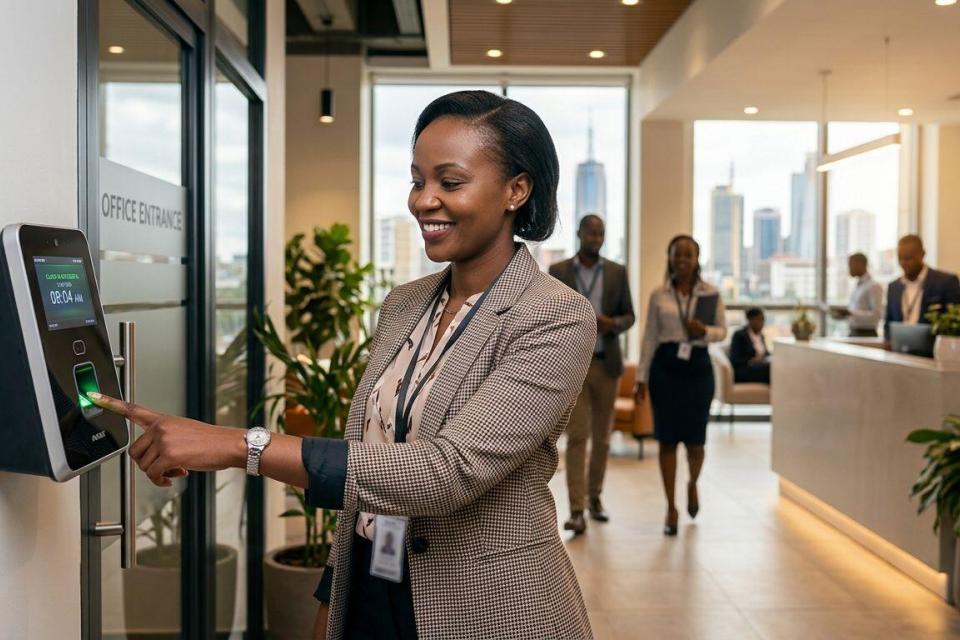
This category covers terminals that verify staff using either a fingerprint scan or a face scan, and sometimes both together for higher security. It suits offices where staff sit at desks most of the day and clock in once or twice.
Fingerprint + face recognition pros:
- Dual verification reduces buddy-punching, since a colleague cannot scan someone else's face or finger
- Face recognition speeds up clock-in during the morning rush without a queue at the sensor
- Works alongside existing access control systems for small businesses already fitted at the entrance
Fingerprint + face recognition cons:
- Costs more upfront than a fingerprint-only unit
- Face recognition accuracy drops in poor lighting or at entrances facing direct sun
Best for: offices and professional service businesses with staff on a fixed desk-based schedule. Verdict: Buy if your headcount justifies the added verification layer.
2. Fingerprint-only terminal: best budget biometric time attendance system
A single-mode fingerprint terminal handles the basics — clock in, clock out, break tracking — without the added electronics of a camera module. It remains the most common entry point for small businesses moving off paper registers.
Fingerprint-only pros:
- Lower complexity means faster installation and less staff training
- Reliable for a stable, small team where enrolment is a one-time task
- Less ongoing maintenance, with no camera calibration to manage
Fingerprint-only cons:
- No fallback when a fingerprint fails to read, whether from dirt, injury or prints worn down by manual work
- Attendance only — no door control unless you pair it with a separate lock
Best for: small businesses under 30 staff running a single shift. Verdict: Buy if budget is the main constraint and your team works from one location.
3. Access control + attendance combo unit: best for running both functions on one terminal
Some terminals double as a door access controller and a time attendance logger. Instead of two separate devices at reception, one unit handles entry authorisation and payroll-feeding attendance logs at the same time.
Combo unit pros:
- One installation point instead of two separate systems
- Attendance data and door-entry logs stay in the same record for audits
- Fits naturally where the business already needs a locked entry point
Combo unit cons:
- More expensive than a standalone attendance terminal
- A fault in one function, such as the lock mechanism, can disrupt attendance logging too
Best for: businesses needing both secured entry and staff attendance at a single controlled doorway. Verdict: Buy only if you genuinely need both functions. Otherwise a standalone unit is simpler.
4. Cloud/app-based attendance system: best for multi-branch businesses
This category syncs attendance data from terminals across different locations into one dashboard, reachable from a manager's phone or laptop. It suits businesses running two or more sites where a single HR office needs consolidated reporting.
Cloud-based pros:
- One dashboard covers every branch instead of pulling reports terminal by terminal
- Managers check attendance remotely without visiting each site
- Scales as new branches open
Cloud-based cons:
- Reliant on connectivity at every branch; a weak link delays sync
- Ongoing data costs at each site add to the running expense
Best for: logistics firms, retail chains and any business with more than one physical location. Verdict: Buy if centralised reporting outweighs the connectivity dependency.
5. Card + fingerprint hybrid terminal: best for high-headcount shift changes
Warehouses and factories clocking dozens of workers in within a short window need a terminal that clears a queue fast. A card-plus-fingerprint hybrid lets staff tap a card first, then confirm with a fingerprint, splitting the verification load.
Hybrid terminal pros:
- Handles high-volume shift changes faster than fingerprint-only queues
- The card layer adds a second data point for payroll audits
- Suited to environments where manual work affects fingerprint quality
Hybrid terminal cons:
- Lost or shared cards undermine the security benefit
- You manage physical card stock alongside the biometric database
Best for: factories, warehouses and construction sites with large shift-based teams. Verdict: Hold unless your headcount and shift pattern genuinely need the extra throughput.
How this ranking works
Each system type above maps back to one criterion. Verification speed decided the top two picks for offices. Template capacity and multi-site sync drove the cloud-based recommendation. Offline buffer and local support matter across every category, whichever terminal you choose.
“If the terminal takes more than a couple of seconds to clear a queue at shift change, the wrong category was picked for that headcount.”
Which biometric time attendance system should you choose?
For a single office with a fixed team, the fingerprint + face recognition terminal is the strongest all-round pick — it balances speed and verification without the complexity of a combo unit. Tight budgets and small teams do fine with a fingerprint-only terminal. Multi-branch operators should default to a cloud-based system whatever the terminal type, because past one location the reporting problem matters more than the sensor. Confirm current equipment and installation pricing before you budget.
Get a biometric attendance quote
Match a terminal to your headcount and site count with Patsec Security Store.
FAQ
What is the best biometric time attendance system for a small office in Kenya?
A fingerprint-only terminal covers most small offices under 30 staff, since it handles clock-in and clock-out without the cost of a camera module. Move up to a fingerprint plus face recognition unit once headcount or buddy-punching risk grows.
Is fingerprint better than face recognition for time attendance?
Neither is universally better. Fingerprint suits staff at fixed desks, while face recognition clears morning queues faster in offices with 20 or more people, and a dual-mode terminal gives you both.
Can a biometric time attendance system also control door access?
Yes. Combo units handle door entry and attendance logging from one terminal, which suits businesses that already need a secured entry point at reception.
Do biometric attendance terminals work during a power outage in Kenya?
Terminals with an offline buffer keep logging locally during an outage and sync once power or network returns. Confirm that feature before buying if outages are frequent at your site.
How does a cloud-based attendance system help multi-branch businesses?
It pulls attendance data from every branch terminal into one dashboard, so HR does not visit each site to pull reports. It needs stable internet at each branch to sync reliably.
What is the difference between a card and fingerprint hybrid terminal and a standard fingerprint terminal?
A hybrid adds a card tap before fingerprint confirmation, which clears large shift-change queues faster. A standard fingerprint terminal is simpler but slower under high volume.
How much does a biometric time attendance system cost in Kenya?
Cost depends on sensor type, template capacity and whether the unit also controls doors, so check current pricing directly with the supplier. Confirm the complete current quote with the supplier.
How many staff can one biometric attendance terminal handle?
That depends on the terminal’s template capacity and how tight your clock-in window is. Match capacity to headcount plus growth room rather than to today’s staff count.
One last thing
The detail that trips up most businesses is not the sensor type — it is skipping the offline buffer check. A terminal with no local storage during a network outage loses that day's attendance data entirely, which means payroll disputes at month-end. Confirm offline logging before you confirm anything else on the spec sheet.
Related guides
- Best CCTV cameras for home security in Kenya
- How much does a home security system cost in Kenya
- Best automatic gate motors for homes in Kenya