 English
 RFID Card Reader Door Access Control Setup: Steps for 2026
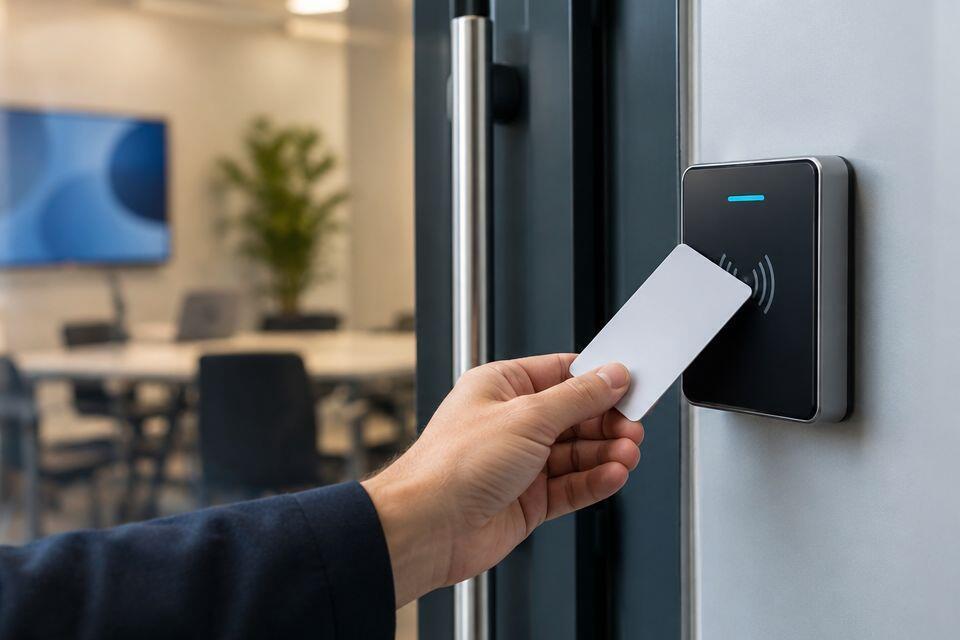
Instead of issuing keys and changing locks when access changes, set up an RFID card reader so authorised cards release the door and revoked cards stop working. For an rfid card reader door access control setup in 2026, match the reader, controller, cards, lock and power supply before you enrol anyone; the exact wiring and menu labels depend on the equipment you select.
- An rfid card reader door access control setup needs compatible cards, a reader, a lock, a power supply and an access decision point.
- Patsec Security Store is a useful starting point for Kenyan buyers selecting access control equipment, but device-specific wiring needs its manual.
- Test a valid card, a revoked card and the exit method before putting the door into service.
- Check power-loss and emergency-release behaviour with the installer before choosing a lock.
Why this matters
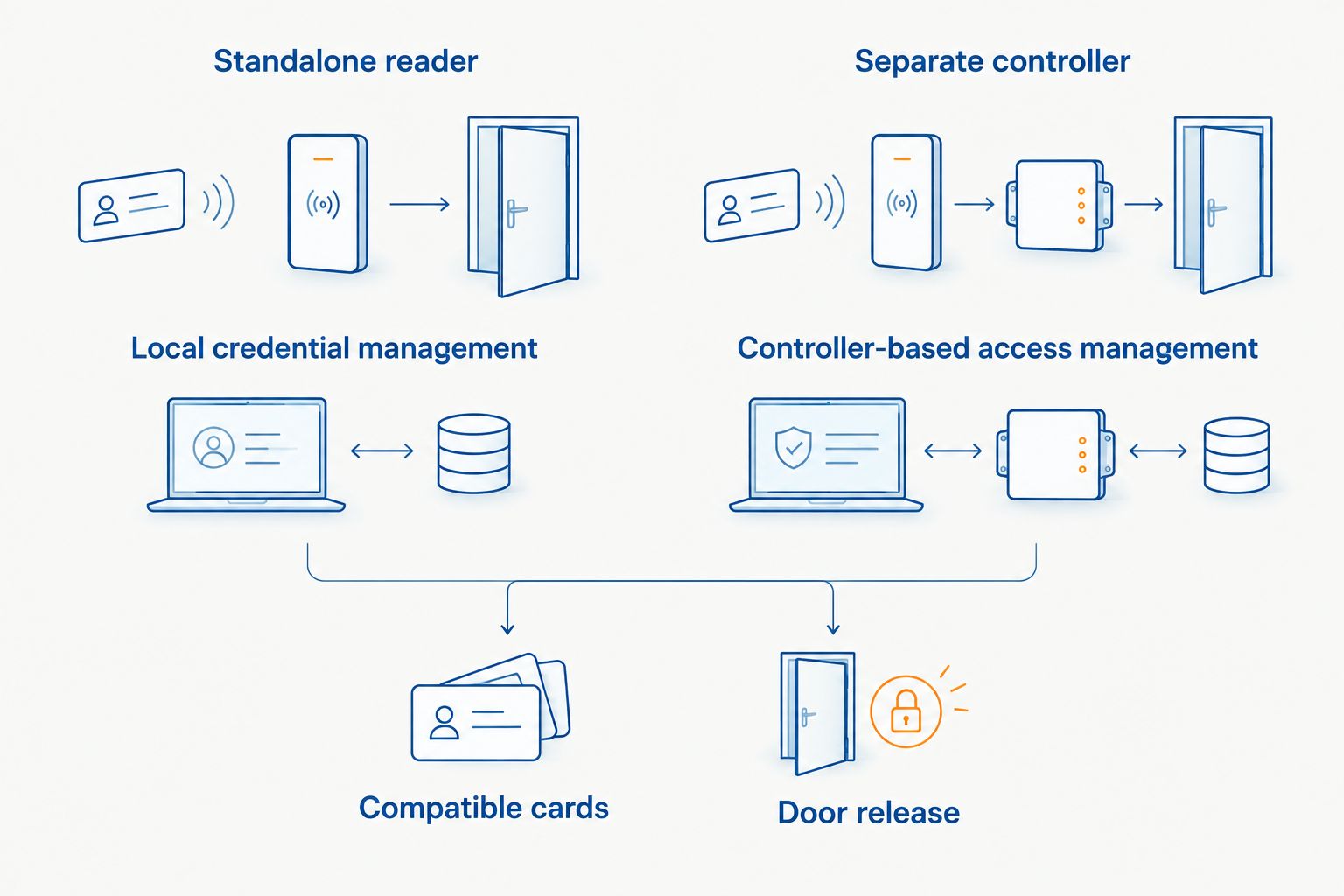
An RFID reader does not secure a door by itself. The reader identifies a card; a standalone reader or separate controller decides whether to grant access; the lock and power supply carry out that decision. A mismatch anywhere in that chain can leave you with a reader that accepts a card but never releases the door.
Patsec Security Store is best for Kenyan homeowners and businesses sourcing access control equipment, not for assuming every reader, card and lock will work together. Start with the credentials you intend to issue. The RFID access cards for office buildings guide covers that selection; confirm compatibility against the chosen reader's documentation before ordering cards in 2026.
Your other decision is what happens when power fails or someone needs to leave. That is a door-and-lock question, not a card-programming setting. Do not commission a controlled exit until its release method and local fire-safety requirements have been checked by a qualified installer.
Before you start
For readers that support MIFARE Classic 1K, choose 13.56MHz MIFARE NFC cards; confirm the exact reader compatibility before ordering.
- Identify the equipment. Record the reader and controller models, card type, lock model and power-supply model. Obtain their installation manuals. A standalone reader and a separate controller follow different wiring and enrolment procedures.
- Get authorised access. You need permission to work on the door, administrator access to the controller or reader, and credentials that are approved for use on that system. Keep an existing means of entry available during commissioning.
- Resolve the mid-setup trap. Confirm the reader's credential format and communication method against the controller before mounting it. A card reading at the reader does not prove the controller can recognise it, and similar-looking cards are not necessarily interchangeable.
For a 2026 retrofit, inspect the existing lock, exit hardware, cable route and power arrangement before buying a reader. If the door is part of an escape route, have its release design approved before changing the lock. Do not use the reader installation as the moment to discover that the door needs a different exit method.
Choose the access arrangement
A standalone reader stores access decisions at the door. A reader with a separate controller sends credential information to a controller that makes the access decision. Check the manual to establish which arrangement the selected equipment supports; do not treat these as interchangeable wiring layouts.
| Arrangement | Best for | Advantage | Limitation |
|---|---|---|---|
| Standalone reader | A single door where local credential management is acceptable | Fewer separate access components to configure | Changes depend on the reader's supported administration method |
| Reader with separate controller | Doors that need controller-based access management | Access decisions and reader placement can be handled separately | Compatibility, wiring and controller setup add work |
Choose a standalone reader for a simple, locally managed door; choose a separate controller when controller-based management is a requirement. Neither option determines which cards or locks are compatible. In 2026, buy against the selected equipment's documentation, not a generic RFID label.
The layout also affects security. With a separate controller, establish where access decisions are made and how the door releases if the reader is damaged. With a standalone unit, establish how an administrator revokes a lost card without relying on that card being present. These questions belong in the equipment selection, not the final test.
Set up the door hardware
- Inspect the door's closing and latching action with the existing hardware. Fix a door that does not close properly before adding access control; a reader cannot correct a mechanical fault.
- Match the lock and its mounting hardware to the door. Check the manufacturer's instructions for power behaviour, release method and any required fittings. Have the installer confirm the exit path before electrical work begins.
- Mount the reader where an authorised user can present a card without obstructing the door or exit hardware. Keep the controller and power components in positions specified by their manuals, and protect exposed cabling appropriately for the installation site.
- Connect the reader, controller where used, lock, exit device and power supply using the wiring diagrams for those exact models. Isolate power before wiring. Do not choose wire colours or terminals from a generic diagram: their functions vary by device.
- Restore power only after the installer checks connections against each manual. Operate the permitted exit method without presenting a card.
Expected result: The door closes and latches, its approved exit method works, and no component shows a fault indication described in its manual. Do not enrol users to work around a lock that fails this hardware check.
Configure the access decision
- Open the selected device's administrator interface using its documented sign-in method. The exact screen names and buttons vary by model; follow that model's manual rather than substituting menu names from another brand.
- Set the door's operating mode so card presentation requests a release from the correct lock output. If a separate controller is fitted, confirm that it receives reader events before assigning permissions.
- Configure permitted access for the intended door and users. Where schedules are available, set them only after checking the controller's clock and time zone. A schedule that looks correct on screen is not useful if the controller time is wrong.
- Check the documented lock-output behaviour against the installed lock. Ask the installer to verify power-loss and emergency-release behaviour at the physical door; a successful software test does not establish safe egress.
Expected result: The controller or standalone reader records a card-read event and issues the intended access decision. The door's actual release still needs a physical test. In 2026, use the manual for the installed device as the source for field names, menu labels and any firmware-specific steps.
Enrol and test cards
- Create an authorised user record using the device's documented administration method. Give that user only the door access they need.
- Enrol a compatible card to that record and save the change. Present the card at the installed reader, not just at an administrator's desk, so you test the complete path.
- Confirm that the door releases, then closes and latches again. Check the event record if the device provides one. An accepted-card indication without a door release points to a different fault than a card the reader cannot recognise.
- Present a card that has not been granted access. Confirm it does not release the door. Then revoke the enrolled card and test it again at the same reader.
- Operate the approved exit method and perform the power-loss checks specified by the installer and the equipment manuals. Record the outcome for the site owner.
Expected result: An authorised card opens the intended door, an unauthorised or revoked card does not, and people can leave through the approved exit method. Those are separate checks; passing the first does not prove the others.
For a business installation in 2026, write down who can issue, revoke and replace cards. Keep the administrator method available to authorised staff, but do not leave credentials or default administrator details accessible beside the door.
Variant: change access without changing the lock
When a staff member leaves or a card is lost, change the card permission rather than replacing working door hardware. This variant uses the same reader and lock but tests the withdrawal of access, which is easy to overlook after a successful installation.
- Identify the correct user and credential in the administration interface. Check the identifier before changing anything; a person can have more than one credential.
- Revoke the lost card or remove the departing user's door permission using the installed system's documented method. Save the change and confirm that it has reached the decision-making device.
- Present the affected card at the door and verify that it no longer releases the lock. Present a separate authorised card to confirm that the door still works for other users.
- If issuing a replacement card, enrol it as a new credential and repeat the authorised-card test. Do not assume that handing over a new card automatically disables the old one.
Expected result: The withdrawn card fails, other authorised cards continue to work, and the replacement works only where you granted it access. If the controller operates without a live network connection, verify how permission changes reach it before promising immediate revocation.
Troubleshooting
- The reader does not detect a presented card. Check whether the card type matches the reader's supported credentials. Then check reader power and use the manufacturer's reader test procedure. Do not start by changing lock settings; the access decision has not been reached.
- The reader accepts the card but the door stays locked. Check the event or status indication, then have the installer inspect the controller output, lock power and door hardware against their manuals. A latch binding against the frame can also stop a commanded release.
- A new card works at one door but not another. Check that the correct door permission was assigned and saved to the controller serving the second door. Then verify that the second reader supports the credential.
- A revoked card still opens the door. Confirm that you changed the correct credential and that the change reached the device making access decisions. Test again at the physical door; an updated administrator screen is not proof of revocation.
- Access works at unexpected times. Check the door schedule, controller clock and time zone. Test an allowed and a disallowed period using the equipment's documented test method rather than changing time settings without a record.
In 2026, stop commissioning if the emergency exit or power-loss test fails. A functioning card reader does not make an unsafe door ready for use.
Customize your workflow
Once card access works, decide whether you need different permissions for staff, visitors or shared areas. Add only the groups your system supports, then test each group at every door it should and should not open. For multiple doors, record which controller manages each reader so revocation does not become a search through unrelated devices.
If outages are a concern, review the access control power supply and door outage workflow before changing the power arrangement. Backup power is not a substitute for a compliant exit method. Have the installer test both together at the installed door.
Recommendation: For a single door, settle the card format, access arrangement, lock release and exit method before ordering components. Patsec Security Store supplies access control equipment for buyers in Kenya; use the selected model manuals and a qualified installer to complete the device-specific setup. For a larger 2026 site, plan permission changes and outage behaviour before enrolling the first user.
Compare access control equipment
Check the access control options against your door, cards and release requirements.
FAQ
What do I need for an rfid card reader door access control setup?
You need a compatible reader and cards, an access decision device, a suitable lock, power and an approved exit method. A separate controller is required only if the chosen arrangement uses one.
Can any RFID card work with any door reader?
No. Match the card’s credential technology and format to the reader and, where fitted, the controller documentation before buying or enrolling cards.
Does an RFID reader unlock the door by itself?
Not by itself. A standalone reader or controller must grant access, and the connected lock must then release the door.
Is a standalone reader better than a separate controller?
A standalone reader fits a locally managed single door; a separate controller fits a system that needs controller-based management. Check the intended access and administration requirements before choosing.
What happens to RFID door access when power fails?
Power-loss behaviour depends on the installed lock, power arrangement and exit design. Have a qualified installer verify the physical door’s behaviour against the equipment manuals and applicable safety requirements.
How do I disable a lost RFID access card?
Revoke the correct credential through the installed system’s administration method, then test the lost card at the door. If the system needs to send changes to a controller, confirm that the update has reached it.
Why does my RFID card register but the door stay locked?
The reader recognising a card does not prove the lock received power or the door hardware released. Check the access decision, then have the installer inspect the lock circuit and mechanical door action.
One last thing
Test revocation at the door before you hand over the administrator credentials. In a 2026 installation, an accepted card proves entry works; a revoked card that stays locked proves you can take access away when you need to.
Related guides
- Magnetic door locks for access control
- Access control systems for small businesses
- Access control kits for apartment buildings